New Editor shifts text when clicking in focus, hampering ability to copy in code or notes made while offline.

Open
Feature
Editor: Euclid (Advanced)
Reported by
Rashkavar
Opened
Assigned to
Xuroth
Last activity
Waiting for ResponseReproducedUnder InvestigationUI/UXMinor

Description

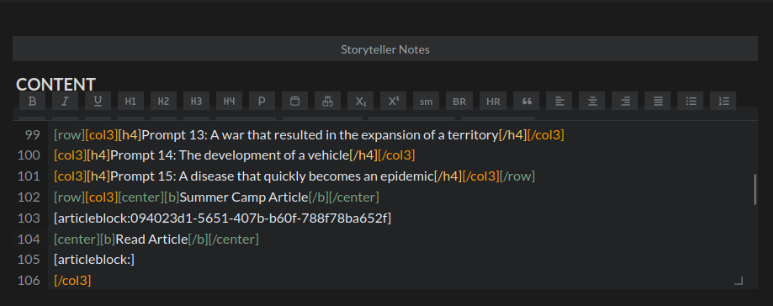
When copying prompt text (the "Somewhere in your world describe..." prompts) into my Summer Camp 2026 article repository, I was repeatedly unable to click the right place, as the text is displaced down several lines when the text window gains focus.

Focused*
Not Focused
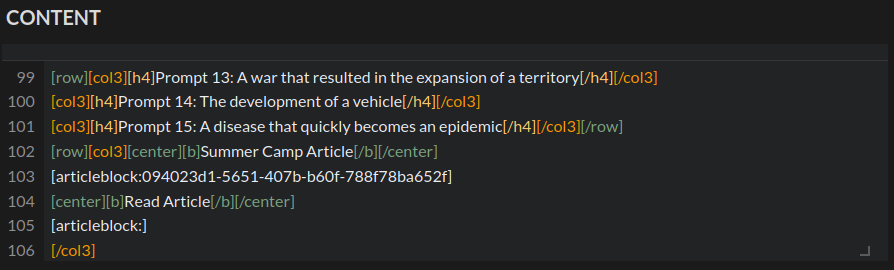
*Apologies for the menu being partly squished in the focused screenshot. The text window briefly lost focus regardless of what I did to take the screenshot, resulting in a half-hidden set of toolbar buttons each time. In normal conditions, the text block would be somewhat lower as the toolbar would be fully opened.


This is, admittedly a very minor problem, but it does add what I must assume would be unintended friction in certain processes that was not present in the old editor with its always-open toolbar. (I also use copy/paste for my standard article formatting, copying words from foreign languages I looked up, and CSS solutions recommended by people on the discord.)

Steps to Reproduce

  • Begin editing an article with multiple lines of content, and scroll down to a section where you might want to paste something.
  • Click a different window to transfer focus, such as the Summercamp homepage to access the prompt phrases.
  • Pick a place to paste something, and click that spot.
  • Observe as your cursor goes to a place a couple of lines higher than intended (I believe thanks to the sudden arrival of the toolbar buttons).
  • History

    Comments and updates to this report

    katerinach Developer
    Assigned xuroth
    Xuroth Assignee
    Added tag Reproduced
    Xuroth Assignee
    Added tag Under Investigation
    Xuroth Assignee
    Added tag UI/UX
    Xuroth Assignee
    Added tag Minor
    Xuroth Assignee
    I am currently working on a fix for this!
    Xuroth Assignee
    This has been updated for a while now, and a recent update added a new feature that should also help.

    As it stands, clicking into the editor should no longer mis-calculate where or what you were tapping/clicking when the editor shifts to show the toolbar. The editor allows the click (place cursor, select word, select line, button press, etc.) to finish before it begins showing the toolbar.

    There is now (as of last week) an option to disable the toolbar autohide altogether! Simply click the gear icon on the editor and in the sidebar of the modal that opens, turn off "Auto Hide Toolbar". You can also go to your Features page and then toggle the "Auto Hide Toolbar" towards the bottom.
    In either case, the toolbar will be set to always show, avoiding the shift altogether.

    Let me know if you're still experiencing this issue, or if it is now fixed for you!
    Xuroth Assignee
    Added tag Waiting for Response